
TensorFlow의 Tensor, Operator, Placeholder, Session은 그래프를 먼저 만들고 나중에 실행하는 방식으로 이해하면 흐름이 잡힌다. 이 글의 메모는 TensorFlow 1.x 스타일의 그래프 실행 모델을 정리한 내용에 가깝다.
Tensor는 다차원 배열 데이터, Operator는 계산 노드, Placeholder는 나중에 값을 넣을 입력 자리, Session은 만든 그래프를 실제로 실행하는 환경으로 보면 된다.
핵심 정리
TensorFlow 그래프 실행 모델에서는 먼저 계산 그래프를 만들고, 그 다음 Session에서 실행하며, 실행 결과를 받아 활용한다. Tensor는 값이 흘러 다니는 다차원 배열이고, Operator는 그 값을 받아 계산을 수행하는 노드다. Constant는 그래프 안에 고정된 값을 넣는 방식이고, Placeholder는 그래프를 만들 때는 자리만 잡아 두었다가 실행 시점에 feed로 값을 넣는 방식이다. Rank와 Shape도 구분해야 한다. Rank는 텐서가 몇 차원인지에 대한 값이고, Shape은 각 차원의 길이를 나타낸다. 현재 TensorFlow의 기본 사용 흐름은 eager execution과 Keras 중심으로 많이 바뀌었지만, 그래프와 Session 개념은 TensorFlow 1.x 코드나 오래된 예제를 읽을 때 여전히 중요한 배경지식이다.
- Tensor는 다차원 배열 형태의 데이터로 이해할 수 있다.
- Operator는 Tensor를 입력으로 받아 계산을 수행하는 그래프 노드다.
- Constant는 그래프에 고정된 값을 담는 노드다.
- Placeholder는 실행 시점에 feed로 값을 넣기 위한 입력 자리다.
- 그래프 실행 흐름은 그래프 빌드, Session 생성, 실행 결과 활용 순서로 볼 수 있다.
- Rank는 텐서의 차원 수를 뜻하고 Shape은 각 차원의 길이를 뜻한다.
- TensorBoard나 그래프 시각화는 노드와 연산 관계를 눈으로 확인할 때 도움이 된다.
- TensorFlow 2.x 중심 코드와 비교할 때는 eager execution 여부를 함께 확인해야 한다.
원문은 Tensor와 Operator를 나누어 보고, Placeholder와 Session 실행 흐름을 직접 메모한 글입니다. 보강문에서는 오래된 TensorFlow 그래프 실행 방식이라는 맥락을 추가했습니다. 최신 예제만 보는 사람에게는 낯설 수 있지만, TensorFlow 1.x 코드나 호환 모드 코드를 읽을 때는 그래프를 만들고 나중에 실행한다는 감각이 핵심입니다.
이어서 볼 글
- Keras 기본 사용법: Sequential, compile, fit 흐름 - TensorFlow 기반 모델을 Keras API로 구성하고 학습하는 흐름이다.
- 머신러닝 학습 자료 메모: TensorFlow, XOR, sigmoid, ReLU - TensorFlow와 XOR, 활성화 함수 학습 키워드를 함께 따라가는 메모이다.
기본
크게봐서 Tensor와 Operator로 구분 가능
Tensor는 다차원배열 자료라고 보면 됨
Tensor를 입출력 변수, Operator를 함수개념으로 보면 이해하기 쉬움
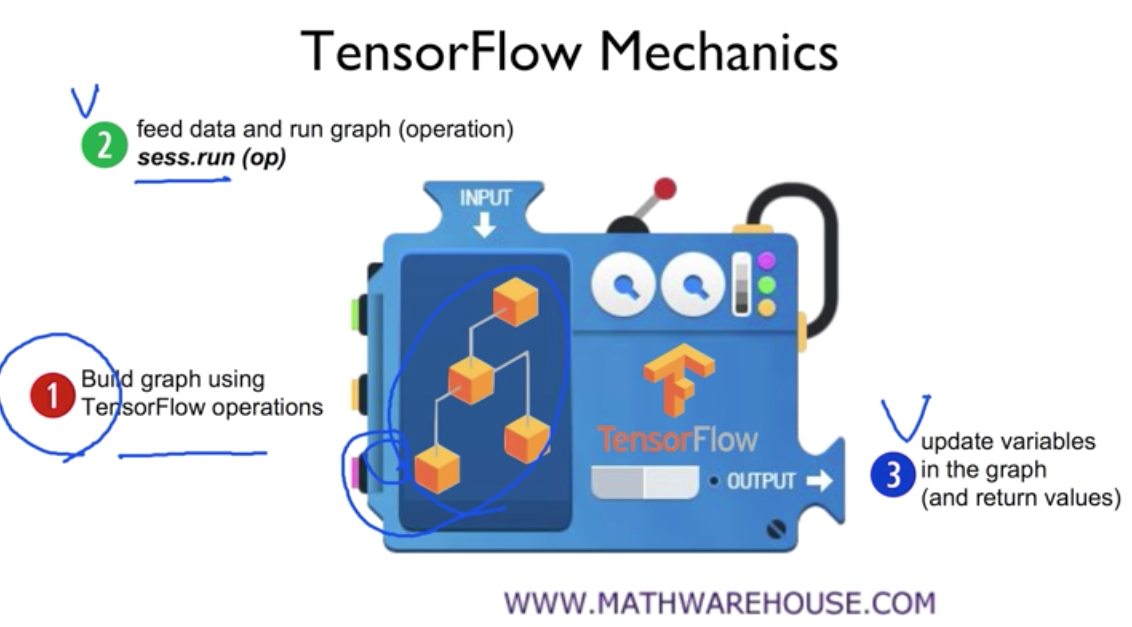
1단계: 그래프를 빌드한다.\\

2단계: session을 만들고 session.run()을 한다.\\
3단계: session.run()의 리턴값을 활용한다.\\

placeholder
tf.constant(3) 하면 숫자가 쓰인 노드가 만들어진다.
tf.placeholder(tf.float32) 이렇게 하면 상수대신에 placeholder가 만들어진다(값은 나중에 대입)
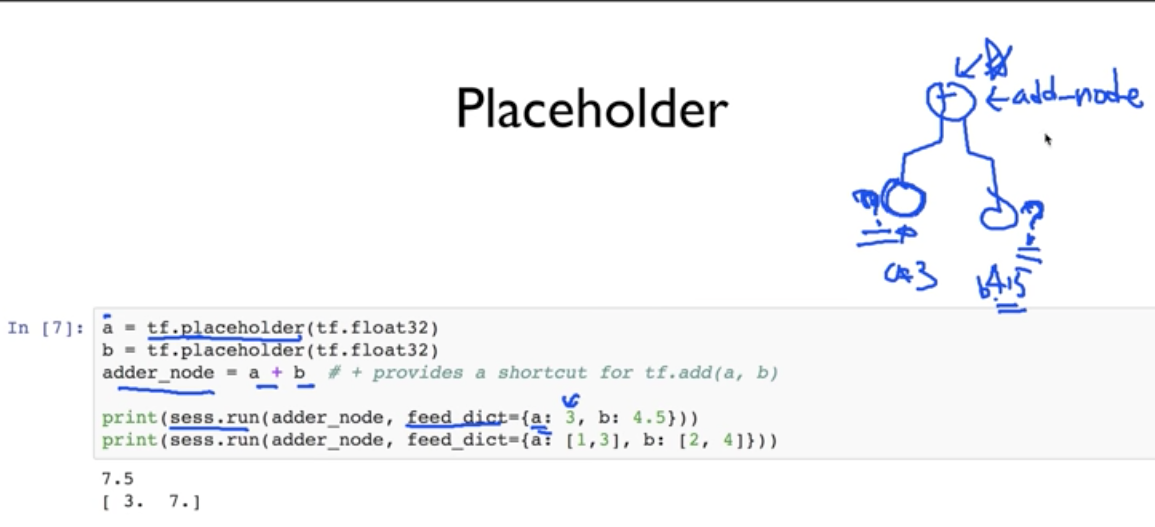
placeholder로 지정된 것은 session.run()할때 feed로 넣어준다는 것 기억~
Tensor
data array
rank: 몇 차원 array냐\\

\\
2차원이면 [i,j]로 element 찾을 수 있고 3차원이면 [i,j,k]로 찾을 수 있다.
shape: 몇by몇 행렬이냐 또는 차원별 길이가 어떻게 되냐..\\

rank랑 shape을 헷갈리지 않도록 주의
일반적인(?) 2차원 행렬이면 rank는 2가되고, shape은 행과열에 따라 [3,4]도 될 수 있고 달라지는 거
주피터에서 사용
그래프 관련 함수
import numpy as np
from IPython.display import clear_output, Image, display, HTML
def strip_consts(graph_def, max_const_size=32):
"""Strip large constant values from graph_def."""
strip_def = tf.GraphDef()
for n0 in graph_def.node:
n = strip_def.node.add()
n.MergeFrom(n0)
if n.op == 'Const':
tensor = n.attr['value'].tensor
size = len(tensor.tensor_content)
if size > max_const_size:
tensor.tensor_content = "<stripped %d bytes>"%size
return strip_def
def show_graph(graph_def, max_const_size=32):
"""Visualize TensorFlow graph."""
if hasattr(graph_def, 'as_graph_def'):
graph_def = graph_def.as_graph_def()
strip_def = strip_consts(graph_def, max_const_size=max_const_size)
code = """
<script>
function load() {{
document.getElementById("{id}").pbtxt = {data};
}}
</script>
<link rel="import" href="https://tensorboard.appspot.com/tf-graph-basic.build.html" onload=load()>
<div style="height:600px">
<tf-graph-basic id="{id}"></tf-graph-basic>
</div>
""".format(data=repr(str(strip_def)), id='graph'+str(np.random.rand()))
iframe = """
<iframe seamless style="width:1200px;height:620px;border:0" srcdoc="{}"></iframe>
""".format(code.replace('"', '"'))
display(HTML(iframe))
위에거 넣어준다음에 아래처럼 하면 그려짐
tf.reset_default_graph()
show_graph(tf.get_default_graph().as_graph_def())
'AI, ML' 카테고리의 다른 글
| Latent Semantic Indexing(LSI)와 NLP 정리 (0) | 2026.05.13 |
|---|---|
| Keras 딥러닝 메모: ResNet, EarlyStopping, he_normal, input_shape (0) | 2026.05.13 |
| Neural Network 기본 개념: MNIST, Cost Function, Gradient Descent (0) | 2026.05.11 |
| MDP 개념 정리: Markov Decision Process, Policy, Reward (0) | 2026.05.11 |
| Prophet 시계열 예측 기본: ds, y 데이터와 forecast 흐름 (0) | 2019.03.07 |